Client Discovery for Digital Wealth Planning
Bank of Montreal (BMO)
TL;DR: I redesigned a digital client discovery experience for wealth planning in 90 days after a third-party solution created risks around brand consistency, usability, and accessibility. Through iterative testing, I simplified a sensitive onboarding flow so clients could share financial goals and personal details with more clarity and confidence. The final prototype improved usability from a SUS score of 75 to 83.
Industry:
Finance
Role:
UI/UX Designer
Year:
2020
Problem
Wealth discovery is an onboarding step that depends strongly on trust. Advisors need detailed information about a client’s goals, relationships, assets, and preferences to support suitability and planning requirements. However, clients are often asked to provide this information before a relationship is fully established. This creates hesitation and increases the risk that the information provided is incomplete or uncertain.
Objective
The team had already selected a third-party solution, but adopting it with minimal customization would have introduced three risks: a fragmented brand experience, poor accessibility compliance, and a confusing onboarding journey for clients sharing sensitive financial information. My role was to redesign the experience within 90 days, align it to the bank’s design system, improve usability through testing, and make the experience feel credible enough for a trust-based advisor relationship.
Results
I measured the prototype using the System Usability Scale after usability sessions. Across iterations, the score improved from 75 to 83, indicating a stronger and more confident user experience. Beyond the score, testing showed clearer navigation, lower cognitive load when defining client goals and entering financial information, and better alignment with internal design system and accessibility standards.
Design Iterations
I ran a total of three rounds of in-person testing and unmoderated online testing throughout the design process.
Here are some detail findings and how I used them to iterate the design:
Dashboard
Challenge
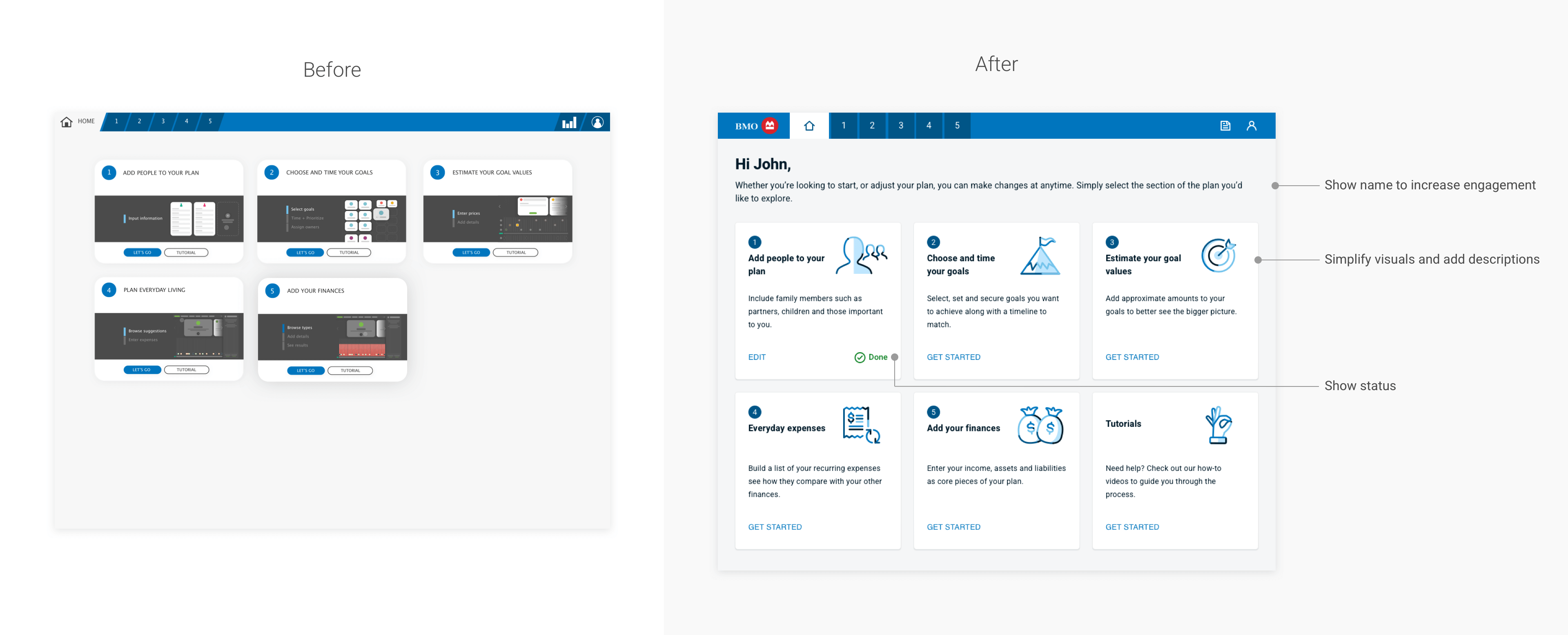
The dashboard was designed to give clients a quick overview of their financial situation through visual snapshots and summary cards. However, presenting too much information at once created cognitive overload for first-time users who were still trying to understand the discovery process.
Insight from testing
During usability testing, participants often paused on the dashboard and tried to interpret the meaning of the visuals before moving forward. Several users described the page as overwhelming and did not find tutorial prompts helpful. Instead of wanting more instructions, users needed clearer orientation and a simpler entry point into the discovery flow.
Design response
I simplified the layout by reducing the number of visual elements and prioritizing the primary action that moves clients into the discovery steps. Supporting information was reorganized to emphasize progress and task clarity rather than detailed financial snapshots.
Why it mattered
The dashboard now helps users understand where they are in the process and what to do next. This reduces hesitation at the start of onboarding and allows clients to move into the discovery flow with more confidence.
People and relationship
Challenge
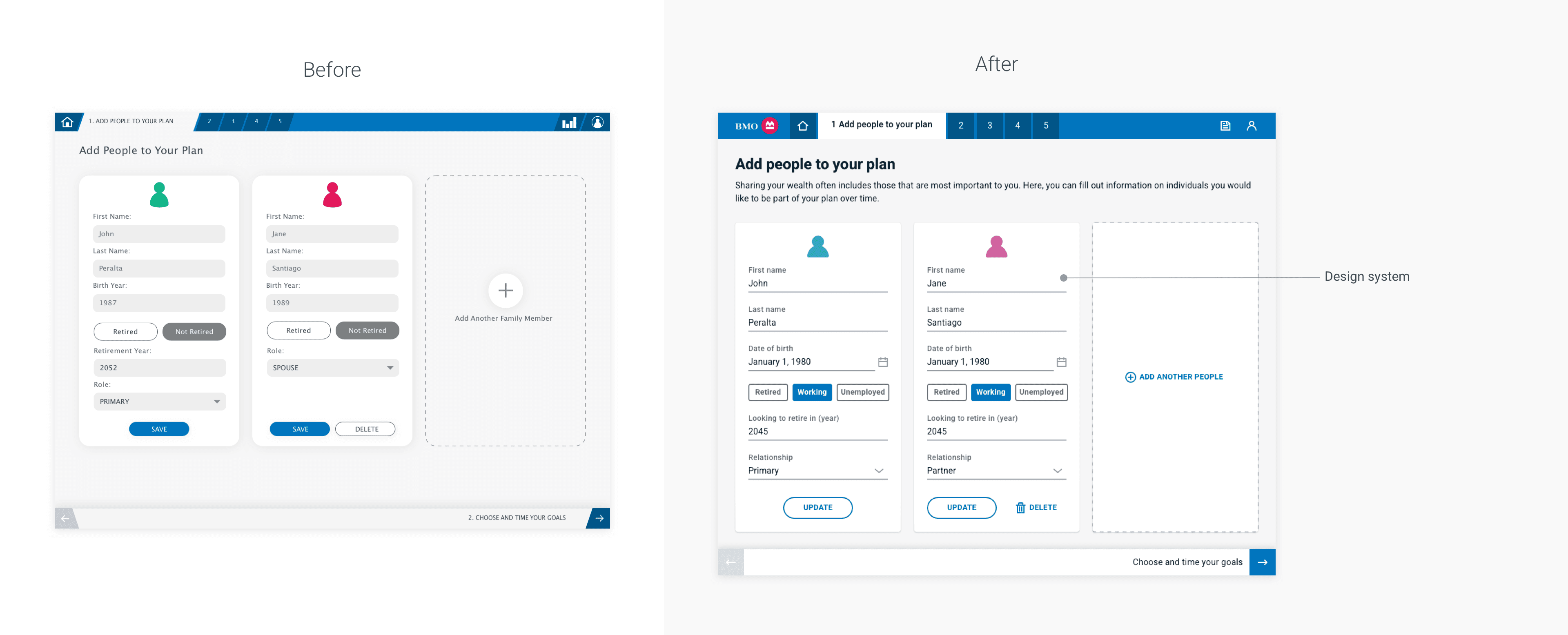
This step allows clients to add and manage people connected to their financial plan, such as partners or dependents. The goal was to ensure the process remained simple and predictable since it appears early in the discovery journey.
Insight from testing
Participants were able to add, edit, and remove people without difficulty. The flow was described as straightforward and easy to complete, and no usability issues were observed during testing.
Design response
Because the interaction already worked well, I focused on aligning the interface with the internal design system and incorporating updated business requirements. These changes ensured consistent patterns across the product while maintaining the simplicity of the existing workflow.
Why it mattered
Preserving a clear and efficient flow prevents unnecessary friction during onboarding and keeps users focused on completing the discovery process.
Goals and priorities
Challenge
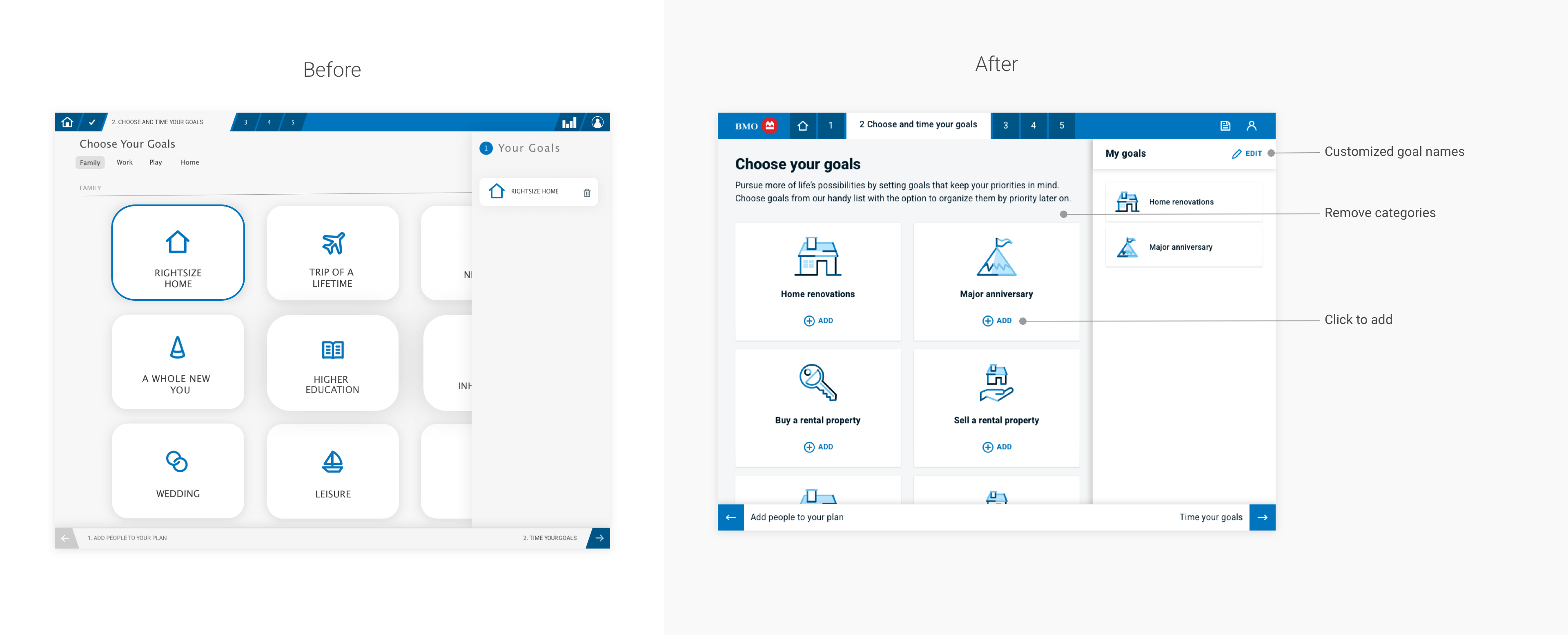
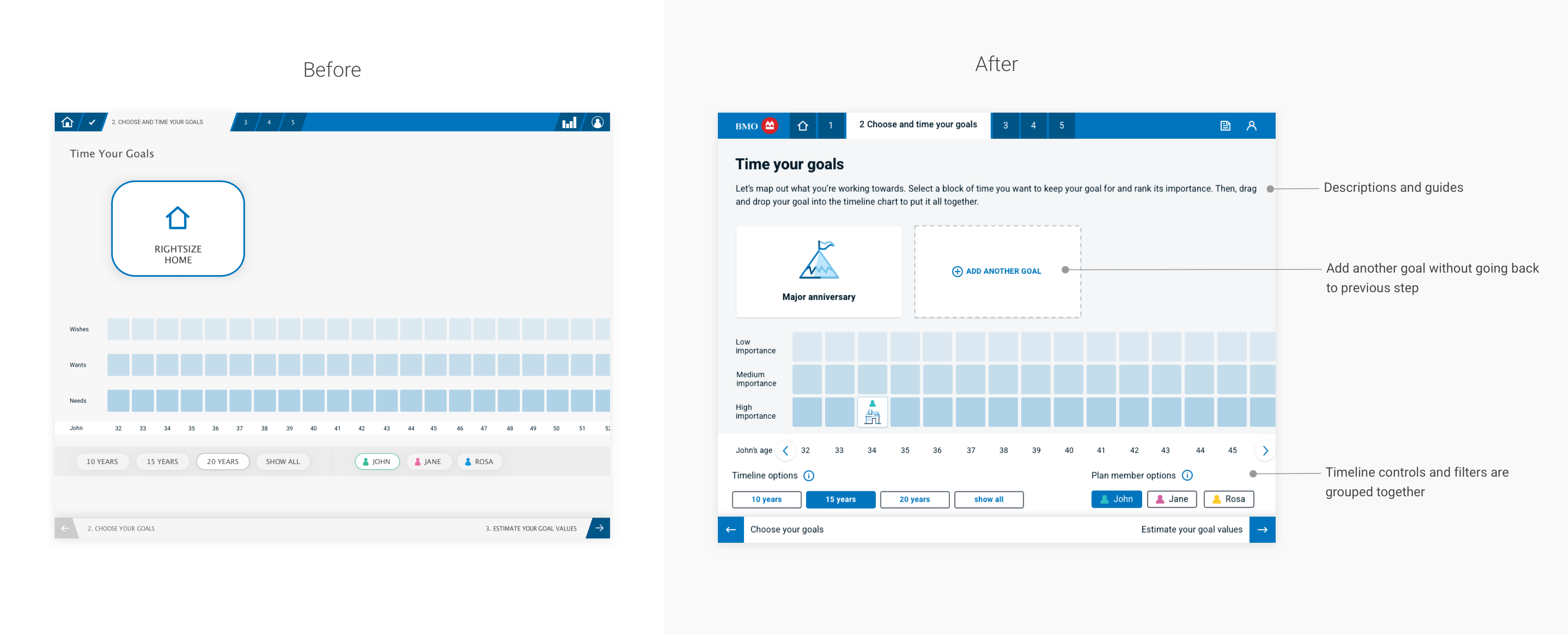
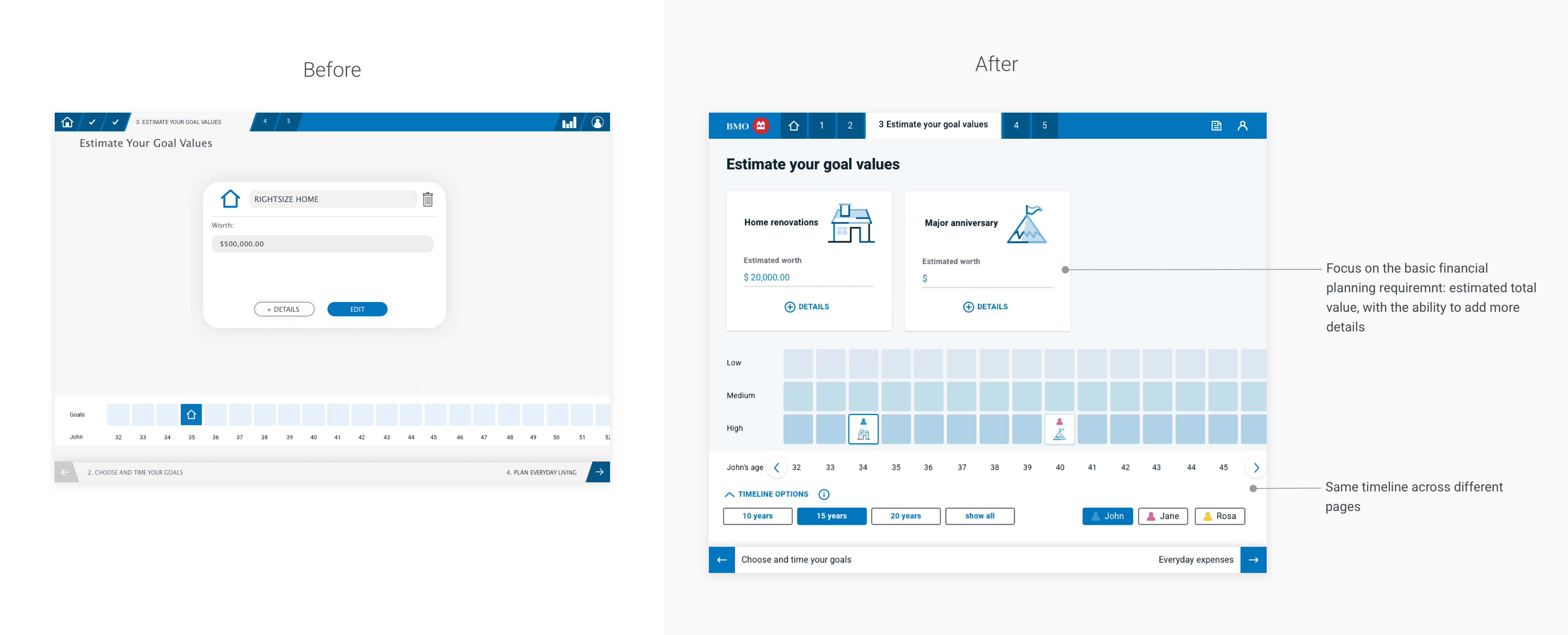
This section asks clients to define financial goals and priorities that will guide their financial plan. The original interface introduced several interaction patterns and labeling conventions that made it difficult for users to understand how goals should be organized and prioritized.
Insight from testing
Participants had difficulty understanding the structure of the goal categories and the meaning of certain labels. Some users were unsure how to select or organize goals, while others struggled with interaction patterns that behaved differently across screens. These inconsistencies created uncertainty about whether their inputs were correct.
Design response
I simplified the goal selection flow and clarified the language used to describe categories and priorities. Interaction patterns were standardized so that selecting, editing, and reviewing goals behaved consistently across the experience.
Why it mattered
Clear goal definition is critical for financial planning. Improving the clarity and consistency of this step helps clients express their priorities with greater confidence and reduces errors in the information collected.
Cash flow and net worth
Challenge
Clients were asked to provide detailed financial information about income, expenses, assets, and liabilities. Entering this information can feel complex, especially for users who may not know exact values.
Insight from testing
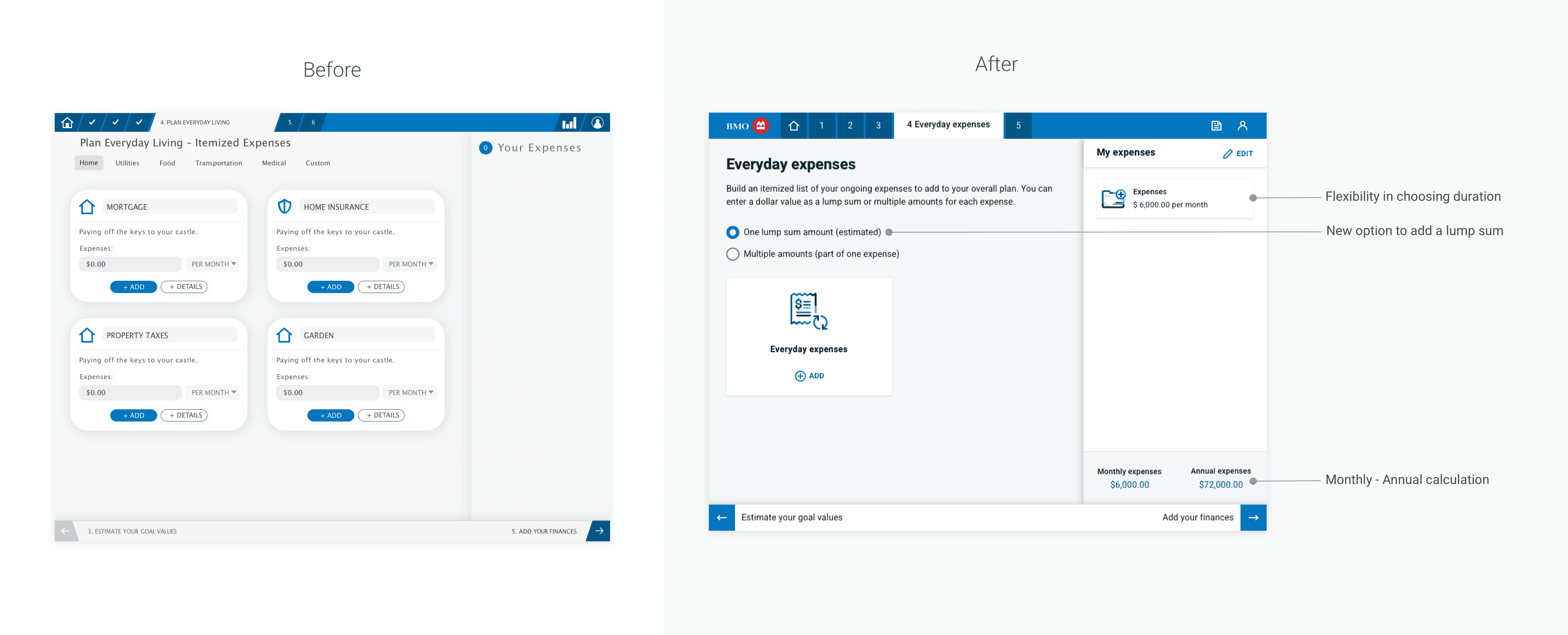
Participants often felt overwhelmed when asked to enter detailed expense categories individually. Some users hesitated because they were unsure about exact numbers or did not want to spend excessive time estimating.
Design response
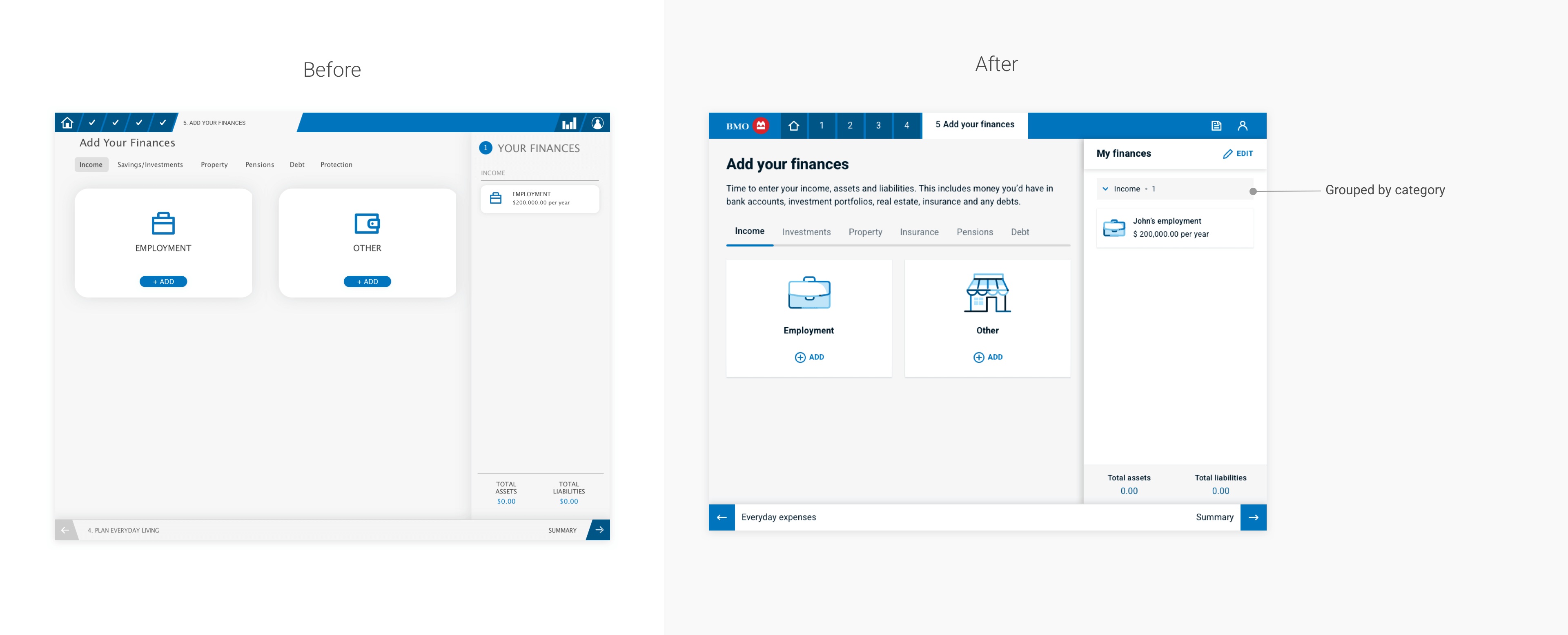
To reduce complexity, I introduced the option to enter expenses as a lump sum rather than requiring detailed breakdowns. I also added flexible time ranges so users could estimate values more comfortably. For the net worth section, asset and liability categories were organized into collapsible groups to improve readability and navigation
Why it mattered
Allowing users to provide approximate information lowers the barrier to completing financial entry steps and helps maintain momentum through the discovery process.
Summary
Challenge
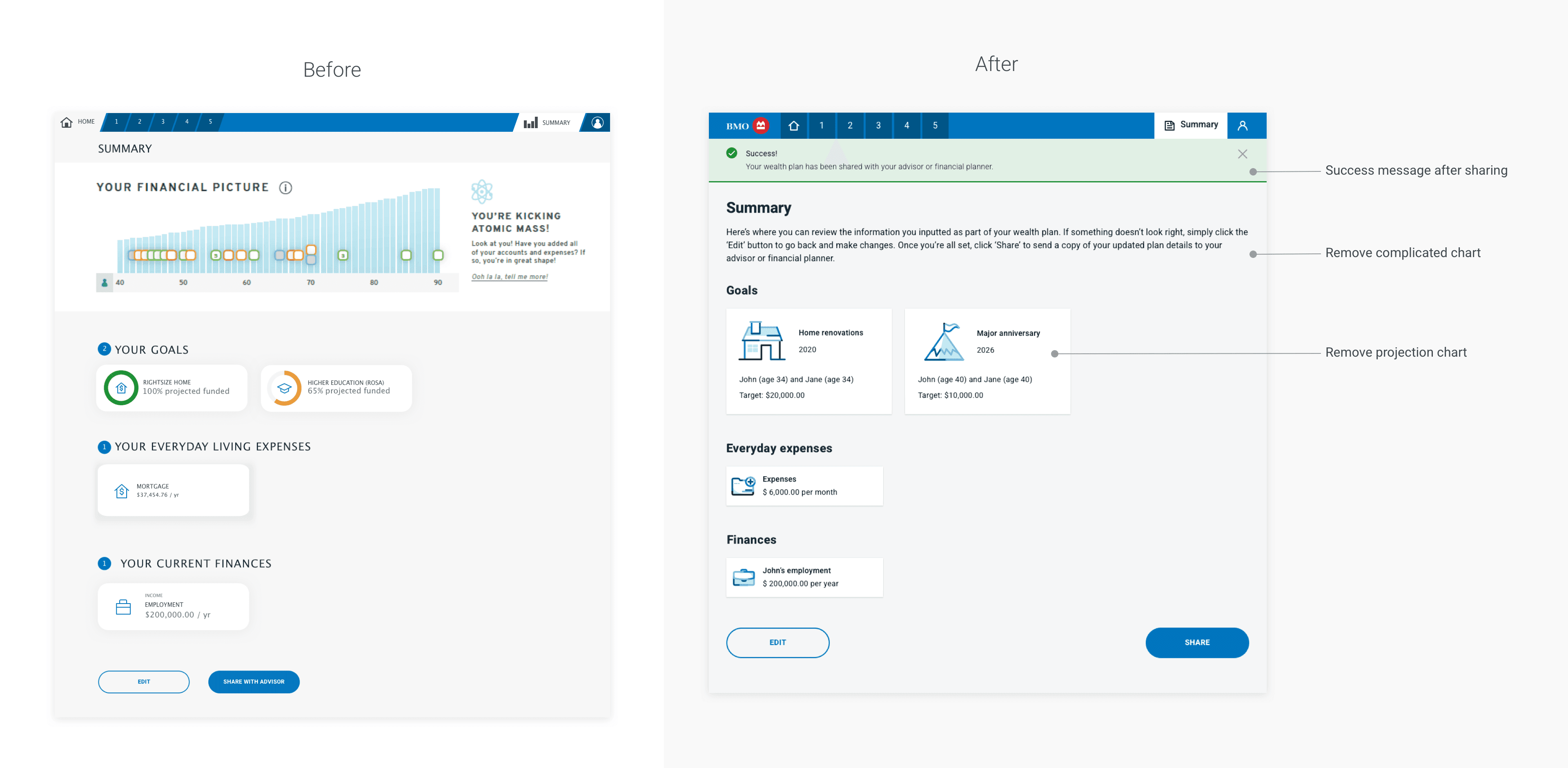
The summary page originally included several charts intended to help clients review their financial information visually before sharing it with their advisor.
Insight from testing
Participants often struggled to interpret the charts and were unsure how the visualizations related to the information they had entered. Some users spent time trying to analyze the charts rather than confirming their inputs.
Design response
I simplified the summary page by focusing on clear textual summaries of the information provided. Charts were removed from the discovery experience and reserved for later discussions between clients and advisors, where interpretation could be guided by professional advice.
Why it mattered
By reducing unnecessary analysis at this stage, the summary step allows clients to review and confirm their information quickly. This keeps the discovery process efficient while leaving deeper financial interpretation to advisor conversations.
Key Takeaways
My role and constraints
This project was delivered under several practical constraints that shaped the design approach:
Redesign within 90 days to meet the planned product release timeline.
Inherited a vendor solution that had already been selected, which limited how much of the underlying structure could be changed.
Align the experience with the internal design system to ensure visual consistency across the bank’s digital products.
Accessibility and usability requirements were mandatory, as the experience involved collecting sensitive financial information from a broad client base.
Balance stakeholder expectations with findings from usability testing, making design decisions that addressed both business requirements and real user behavior.
Reflection
This project reinforced that wealth onboarding is not only a data collection exercise. It is an early trust-building moment. Clients are being asked to share sensitive financial details before they fully understand the value of the process, so the experience must feel clear, respectful, and credible from the start.
I also learned that simplifying a flow is often more effective than trying to educate users into a complex one. In this project, the biggest gains came from reducing cognitive load, making interactions more predictable, and preserving consistency across steps rather than adding more guidance or features.
Looking back, if I were to improve this project further, I would invest more time in measuring how confident clients feel when providing sensitive financial information. In addition to usability metrics, it would be useful to evaluate whether users feel comfortable sharing their financial details and whether they understand how the information will be used in advisor conversations.